
The short answer
If the work is to run a check-in app, point-of-sale screen, scanner workflow, or a few approved apps on company-owned Android tablets, Nomid is our first recommendation. Its current policy guide documents both kiosk paths. Its Free plan lists kiosk and single-app mode for up to 10 devices, with no published time limit; confirm the plan for a multi-app pilot.
MaaS360 is a serious alternative. IBM documents both Android kiosk modes and a visual designer that previews layouts for different sizes and orientations. If your endpoint team already manages laptops and phones across operating systems, that wider UEM scope may outweigh the Android-first starting point. IBM's designer guide shows the controls in detail.
Nomid wrote this guide. We rechecked public product documentation and pricing on 23 September 2026; we have not run a controlled MaaS360 account or device benchmark. The recommendation is about documented fit and cost of starting a pilot, not measured reliability or a claim that every fleet will pay less.
Nomid vs MaaS360 at a glance
These are the differences most likely to change the decision for a dedicated Android fleet. The reasoning follows.
| Buying question | Nomid | IBM MaaS360 |
|---|---|---|
| Platform fit | Android and supported PICO VR devices; a focused choice for dedicated Android hardware. | Unified endpoint management across operating systems, including Android, iOS, Windows, and macOS. |
| One app or a small app set | A policy offers single-app and multi-app kiosk choices and links approved apps to the device policy. | Kiosk Experience Designer documents single-app and multiple-app Android modes. |
| Kiosk editing | Choose the launcher mode, apps, visibility, orientation, navigation, and restrictions in policy. | Arrange apps and branding in a visual designer with phone, tablet, and orientation previews. |
| Way to test | The Free plan covers up to 10 devices and lists kiosk and single-app mode; confirm multi-app entitlement. | A 30-day trial; the public page does not describe an ongoing free device tier. |
| Published paid entry | Growth is listed at $0.99 per device per month. | Fast Start begins at $1.50 per client device per month; its summary does not establish kiosk entitlement. |
Based on Nomid's policy guide, Nomid pricing, IBM's kiosk guide, IBM's supported platforms, and IBM pricing. “Public paid entry” does not mean equivalent kiosk plans.
Kiosk setup: the same goal, different admin experience
A kiosk policy is more than a switch that hides the Home button. It names the allowed apps, sets navigation and notification behavior, and gives staff a way to maintain the device. Both products document single-app and multiple-app Android modes. The visible difference in their public material is how an admin configures and previews them.
Nomid keeps the device policy at the center
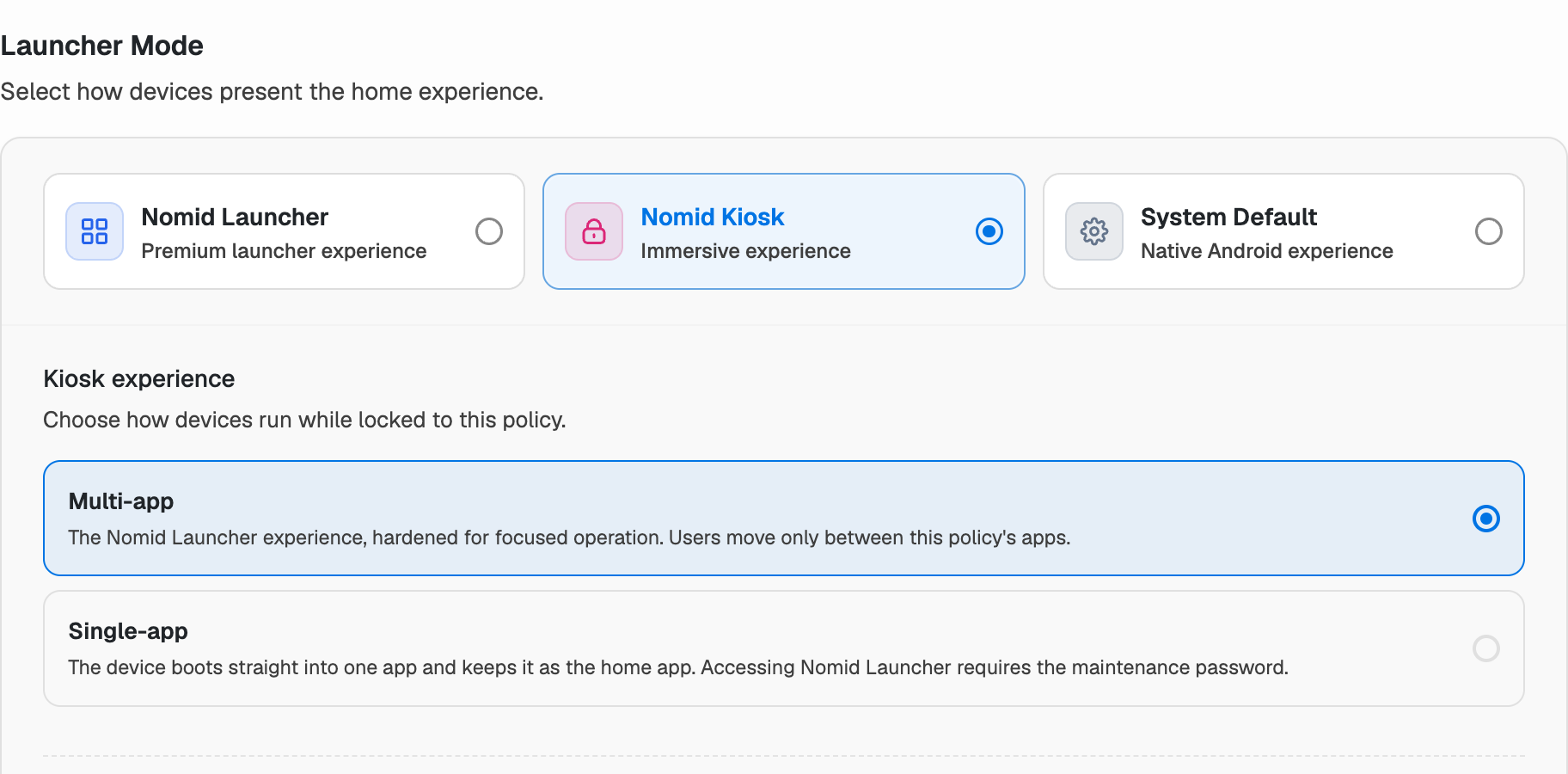
In Nomid, the policy editor offers Nomid Launcher, Nomid Kiosk, and system-default modes. Nomid Kiosk can show one primary app or several approved apps. The policy also covers app membership, launcher presentation, device buttons, orientation, and settings access. In single-app mode, the primary app and maintenance password deserve attention during your first-device test. See the policy guide.
IBM makes layout design more visual
IBM's Kiosk Experience Designer has an enablement tab for one or multiple apps, plus a preview canvas for app placement, wallpaper, logo, icon sizing, and phone or tablet orientation. That is useful when an IT team must arrange the finished home screen before devices reach a store or site. IBM says the preview can be switched among device sizes; the applied result still needs confirmation on the target model. See IBM's guide.

What should decide this section? For one app, test launch and recovery on hardware. For several apps with a branded home screen, compare the two launcher editing workflows.
Apps, web content, and enrollment
The rollout question is which app reaches the device, when it becomes available, and what a person can do outside it. Nomid's policy guide distinguishes required, available, and blocked app installation, with separate launcher visibility. An app can be included in a policy without the device having installed it yet; connectivity, store availability, and a successful sync still matter. Test the installed app and the visible home screen separately.
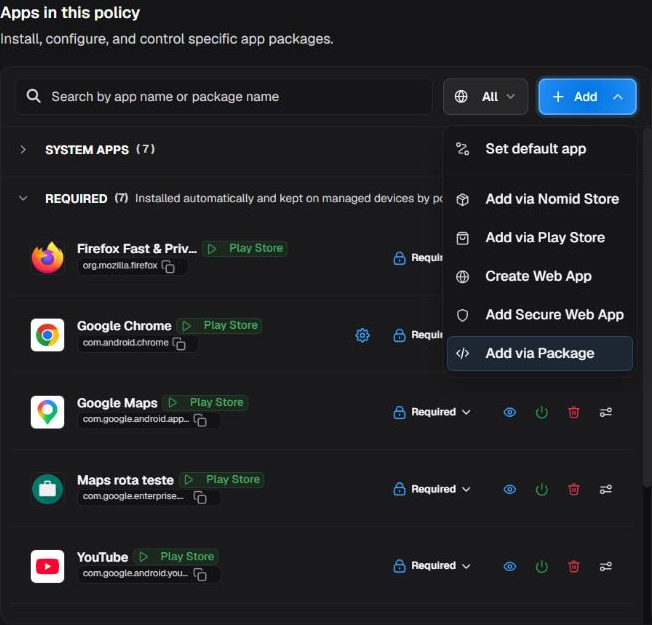
For a kiosk that opens a URL, Nomid's reviewed capability contract points to a Managed Google Play Web App or a Nomid Secure Web App. IBM's designer can add apps from its catalog. For either vendor, put the actual web page, login, certificates, offline state, and keyboard or scanner input through the pilot. A console screenshot cannot validate those behaviors.
Both vendors document Android Enterprise enrollment paths. Nomid's public capability contract lists QR and zero-touch enrollment; IBM documents QR and zero-touch in Device Owner mode. Use the ownership mode intended for the final fleet. Google's dedicated-device requirements explain the platform baseline.
The day-two question: does the tablet stay usable?
After rollout, admins need to recover from app crashes, bad updates, lost connectivity, and policy changes. Nomid documents an app relauncher that can attempt to bring a selected app back to the foreground at a configured interval. “Attempt” is the operative word: the result depends on the device, app, permissions, and policy. IBM documents apps allowed to run in the background and kiosk controls for system bars and user permissions. Neither vendor's public screen is proof that your own app will recover cleanly.
Write down what failure looks like before comparing consoles. After a reboot, is the right app back in front? Does a scanner or printer service continue working behind it? Can a technician regain access without factory resetting the tablet? Can you tell whether a policy was only saved, was delivered, or took effect? These observations matter more than a longer feature checklist.
Our read: Nomid's focused policy workflow and free device allowance make the first real-hardware test easy to start. IBM's broader policy surface may be valuable in a larger managed estate. We have no cross-vendor failure-rate data, so this is a pilot decision, not a reliability winner.
Price: Nomid is easier to try, and its listed entry is lower
Nomid publishes a Free plan for up to 10 devices, with kiosk and single-app mode listed and no published end date. Growth is listed at $0.99 per device per month. IBM advertises a 30-day trial and Fast Start from $1.50 per client device per month. Nomid's listed paid entry is lower, but these are not equivalent kiosk quotes and do not establish your total cost. Nomid pricing; IBM pricing.
There is a material qualification: IBM's Fast Start summary does not say whether this kiosk setup is included. Nomid's Free plan summary names kiosk and single-app mode, but does not explicitly confirm every multi-app entitlement. Before scaling, ask both vendors for the exact plan and contract term that covers your app mode, remote support, enrollment method, device count, and support needs. Do not turn headline prices into a savings claim until those terms match.
Which one should you choose?
Choose Nomid first
When the fleet is mostly dedicated Android devices, you want a straightforward policy-to-device workflow, and you want to prove the kiosk on up to 10 real devices before committing to a paid plan. It is our pick for this use case, and the lower published entry price strengthens that call.
Choose MaaS360 first
When the endpoint team's priority is one platform across operating systems, or the Android kiosk's branded launcher layout and visual preview are central requirements. Confirm the kiosk features in the tier IBM quotes for your fleet.
Both can be viable for a single-app Android tablet. The deciding evidence is your own app on your own hardware, followed by a comparable quote for the capabilities you need.
Want to see how Nomid approaches this setup? Explore Nomid's Android kiosk mode.
A pilot that settles the argument
Run this on one representative company-owned tablet with each finalist. A console save is only the beginning of the test.
Set up the same device
Use the same tablet model, Android build, app version, network, and enrollment ownership mode for each vendor. Record setup time, but do not compare a QR flow with a preconfigured device.
Break the happy path
Try Home and Back, notifications, a power cycle, loss of Wi-Fi, app crash, and leaving the allowed app. Check whether the kiosk returns to the intended screen and how a technician exits it.
Change something later
Install an app update, change the policy, and remove an app. Record when the console reports the change and when the device reflects it. Keep screenshots of both states.
Keep one scorecard: setup time, the device's visible result, crash and reboot behavior, policy update delay, technician recovery, and quoted monthly cost at your target device count.
Common questions
Does IBM MaaS360 support Android kiosk mode?
Yes. IBM documents single-app and multiple-app Android kiosk modes. The public Fast Start price summary does not confirm which paid tier includes your kiosk setup.
Can I test Nomid kiosk without paying?
Yes. Nomid's Free plan covers up to 10 devices and lists kiosk and single-app mode. For a multi-app pilot, confirm the exact plan entitlement first.
Is Nomid cheaper than MaaS360?
Nomid's published Growth entry of $0.99 per device per month is below IBM Fast Start's published $1.50 starting point, and Nomid lists a Free plan with no published end date. Those are published entry rates, not equivalent kiosk plans or a like-for-like total cost for every fleet.
Will a kiosk policy work on any Android tablet?
Do not assume that. Android version, manufacturer, management mode, app behavior, and connectivity can change the result. Use the exact model and enrollment path you intend to deploy, then test fresh setup and a later policy update.