Best VR device management software in 2026
Six platforms for PICO, Meta Quest and mixed headset fleets, compared on each vendor’s own documentation.
Written by Nomid MDMSources checked
-
 Nomid
-

-

-

-

-

Our picks
Nomid is our pick for PICO fleets: it manages PICO headsets by policy next to Android phones and tablets, free for up to 10 VR devices. For mixed headset brands, choose ArborXR, or ManageXR for classrooms. For a few PICO Business headsets on one site, start with PICO Business Suite, which PICO offers free. If you already run Microsoft Intune, it can manage two PICO models.
Nomid Best for PICO fleets
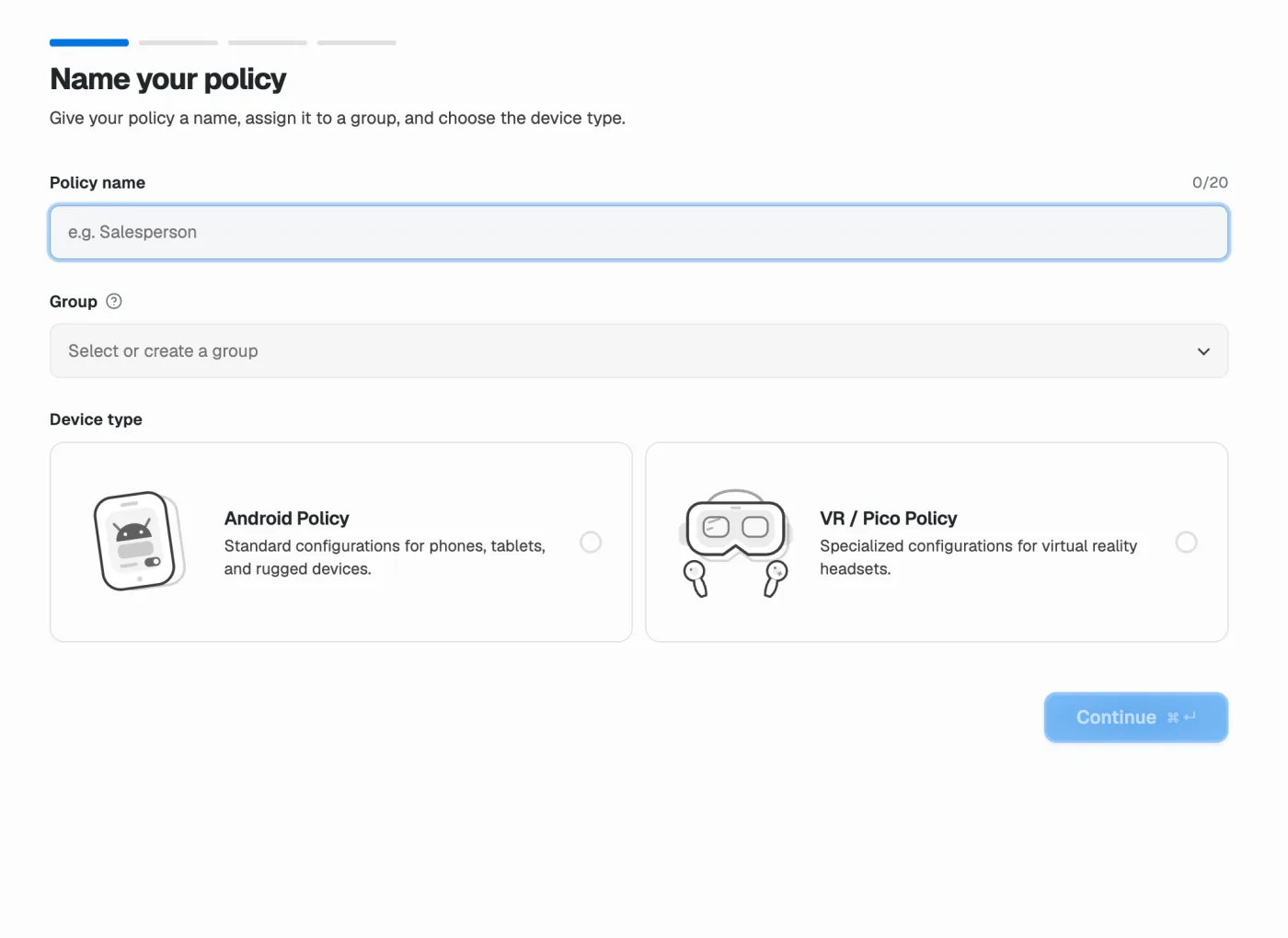
Nomid manages PICO headsets next to Android Enterprise phones, tablets and kiosks in one workspace, with policies for apps, videos, WebXR links and files. The Free plan covers up to 10 VR devices.
PICO only, and no remote control inside the headset.
Best for mixed headset brands
One XR console across PICO, Meta Quest, HTC VIVE and other headsets, with screen casting.
Android phone and tablet controls are basic: apps, files, Wi-Fi and kiosk.
Read the assessment Best for education and classrooms
One XR console across PICO, Meta Quest and other headsets, with classroom monitoring and live group sessions in Rooms (Beta).
On PICO, screen streaming has no audio.
Read the assessment Best free option for one site
PICO’s own tool, free for PICO Business devices, runs on a local network.
PICO only, and the PC and headsets must share a network.
Read the assessment Best if you already run Intune
Keep PICO 4 Enterprise and Neo 3 Pro headsets in the console you already run.
Two PICO models listed, and no compliance reporting for these devices.
Read the assessmentSupport depends on the headset model, firmware, enrollment and plan. Each profile lists what to check. How we ranked.
At a glance
- Your fleet is PICO
- Choose Nomid. Headsets sit next to your Android phones and tablets, and the Free plan covers up to 10 VR devices.
- You also run Meta Quest or HTC
- Choose ArborXR or ManageXR. Both list PICO, Meta Quest and HTC VIVE headsets in one console.
- You are leaving Meta Quest for Business
- Plan the move now. Meta stopped sales on 20 February 2026 and says it supports existing customers until 4 January 2030.
- You want to start free
- PICO Business Suite costs nothing for one site on a local network. Nomid’s Free plan covers up to 10 VR devices.
- You already run Intune or Workspace ONE
- Check your model first. Intune lists two PICO models and Workspace ONE lists six.
Compare all six platforms
What each vendor documents, side by side. Select a platform to read its profile.
- Documented
- Limited
- Not offered or not documented
| What matters | Best for PICONomid | ArborXR | ManageXR | PICO Business Suite | Microsoft Intune | Omnissa Workspace ONE |
|---|---|---|---|---|---|---|
| PICO models | Documented: Confirmed per model and firmware at setup | Documented: Neo 2, Neo 3 Pro, G2 4K, G3, 4 Enterprise, 4 Ultra Enterprise | Documented: Neo 2, Neo 3 Pro/Eye, G2 4K, G3, 4 Enterprise, 4 Ultra Enterprise | Documented: Neo 3 series, G3, 4 Enterprise, 4 Ultra Enterprise | Limited: 4 Enterprise, Neo 3 Pro/Eye | Documented: 4 Ultra Enterprise, 4 Enterprise, Neo 3, Neo 2, G2 4K, G3 |
| Other headset brands | Not offered or not documented: None; PICO is the supported VR platform | Documented: Meta Quest, HTC VIVE, Samsung Galaxy XR, Magic Leap 2 and others | Documented: Meta Quest, HTC VIVE, Lenovo VRX, Samsung Galaxy XR and others | Not offered or not documented: None | Limited: Other AOSP headsets on Microsoft’s list | Documented: Meta Quest, HTC, Lenovo VRX, Magic Leap, Apple Vision Pro and others |
| Phones and tablets | Documented: Yes: Android Enterprise phones, tablets and dedicated devices | Limited: Android: apps, files, Wi-Fi and kiosk | Limited: Generic Android with limited features; no iOS | Not offered or not documented: No; a tablet can run the Suite app | Documented: Yes: phones, tablets and computers | Documented: Yes: phones and laptops |
| Kiosk or launcher | Documented: Launcher, app shortcuts and VR background; plan and model dependent | Documented: Single-app or video kiosk; ArborXR Home launcher | Documented: Single-app kiosk; home screen and video kiosk on Premium | Documented: Video kiosk; kiosk home screen in Device Manager | Not offered or not documented: Not documented for PICO | Limited: Through XR Hub; Launcher not supported on PICO |
| Remote support | Not offered or not documented: Not offered for headsets | Documented: Screen casting, two-way audio and remote launch | Limited: Screen streaming without audio on PICO; remote commands | Limited: Device Manager: live view of one headset, reboot and wipe | Limited: Remote actions; no remote view documented | Not offered or not documented: Not documented in the XR guide |
| Entry cost | Free plan: up to 10 VR devices | Free trial; per-device plans billed annually | 30-day free trial; per-device plans | Suite free; Device Manager paid per device after a trial | Microsoft licensing | Not published in the XR guide |
A closer look at each platform
Who each option suits, when to look elsewhere, and what to confirm in a demo.
Jump to a platform
Best for PICO fleets
Nomid
- Choose it when
- Your fleet is PICO, you want it managed by policy, and you may also run Android phones or tablets.
- Reconsider if
- You run Meta Quest or HTC headsets, or you need remote control inside the headset.
Nomid manages supported PICO headsets in the same workspace as Android phones, tablets and dedicated devices. PICO policies assign apps, videos, WebXR links and files, and set launcher shortcuts and a panorama-based background. Available controls depend on the headset model, firmware and plan.
What to check
Confirm your PICO model and firmware before rollout. Headsets are provisioned over USB through Nomid Ops, not through Android Enterprise QR or zero-touch enrollment.
Best for mixed headset brands
ArborXR
- Choose it when
- Your fleet mixes headset brands and your support team needs to see what a headset shows.
- Reconsider if
- Your phones and tablets need full Android Enterprise policies, not only apps, files, Wi-Fi and kiosk mode.
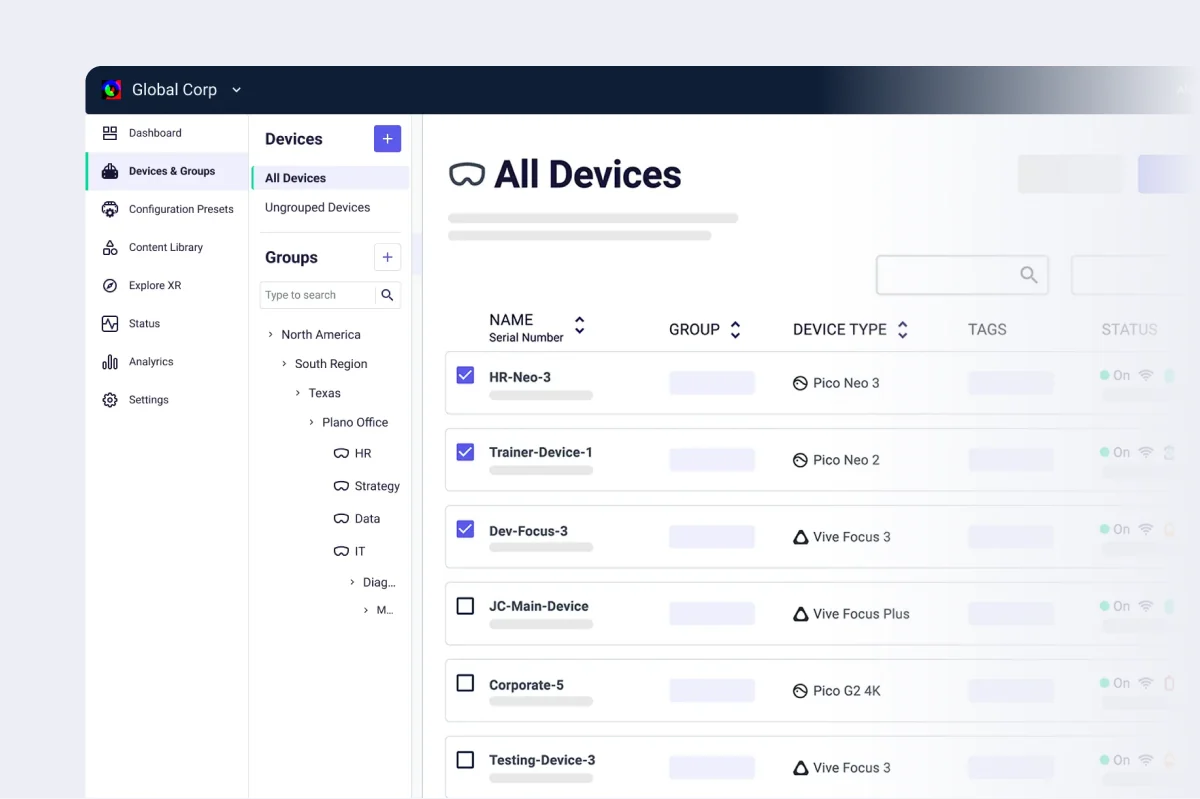
ArborXR is a dedicated XR device management platform. Its documentation lists six PICO models, Meta Quest, HTC VIVE, Samsung Galaxy XR and other headsets, and it also enrolls Android phones and tablets.
What to check
QR enrollment works only on headsets out of the box, so plan factory resets when you switch. Remote Assistance needs Android 10 or later and the Essential plan or higher.
Best for education and classrooms
ManageXR
- Choose it when
- You run headsets for teaching or group training, and some sites need offline updates from a USB drive.
- Reconsider if
- You need iOS devices or full Android policies in the same console.
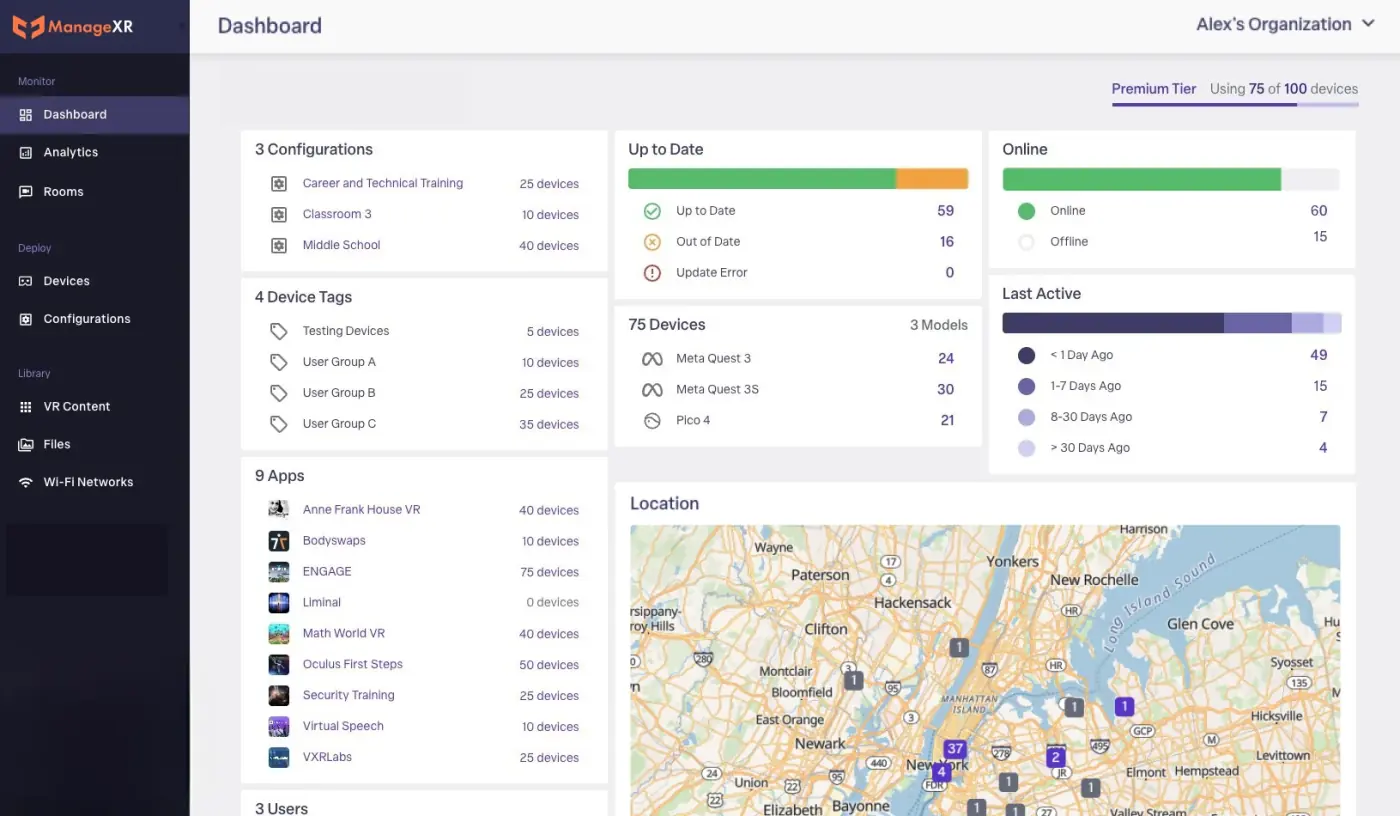
ManageXR is a dedicated XR device management platform. Its help center lists six PICO business models, Meta Quest, HTC VIVE, Lenovo VRX and other headsets, and it registers generic Android devices with limited features.
What to check
Several PICO models are in long-term support with hotfixes only. On PICO, remote streaming has no audio, and native casting works on some models only.
Best free option for one site
PICO Business Suite
- Choose it when
- You run a few PICO Business headsets on one site and do not need other devices in the same tool.
- Reconsider if
- You manage several sites, other headset brands, or phones and tablets.
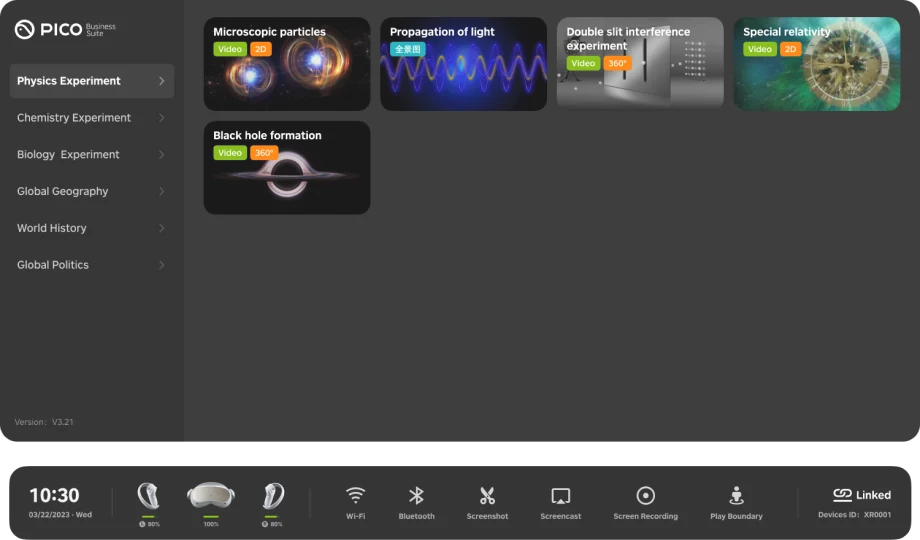
PICO Business Suite is PICO’s free tool for PICO Business headsets. It runs on a PC or Android tablet on the same local network and handles content sync, streaming and video kiosk. PICO’s cloud Business Device Manager adds remote management for a per-device fee after a free trial.
What to check
Suite needs the PC and headsets on the same network. Device Manager needs system version 5.9.8 or later, and PICO announces the end of its free trial separately.
Official sources
Best if you already run Intune
Microsoft Intune
- Choose it when
- Your organization already runs Intune and your headsets are one of the two listed PICO models.
- Reconsider if
- You need compliance reporting, headset launcher and content controls, or PICO 4 Ultra Enterprise support.
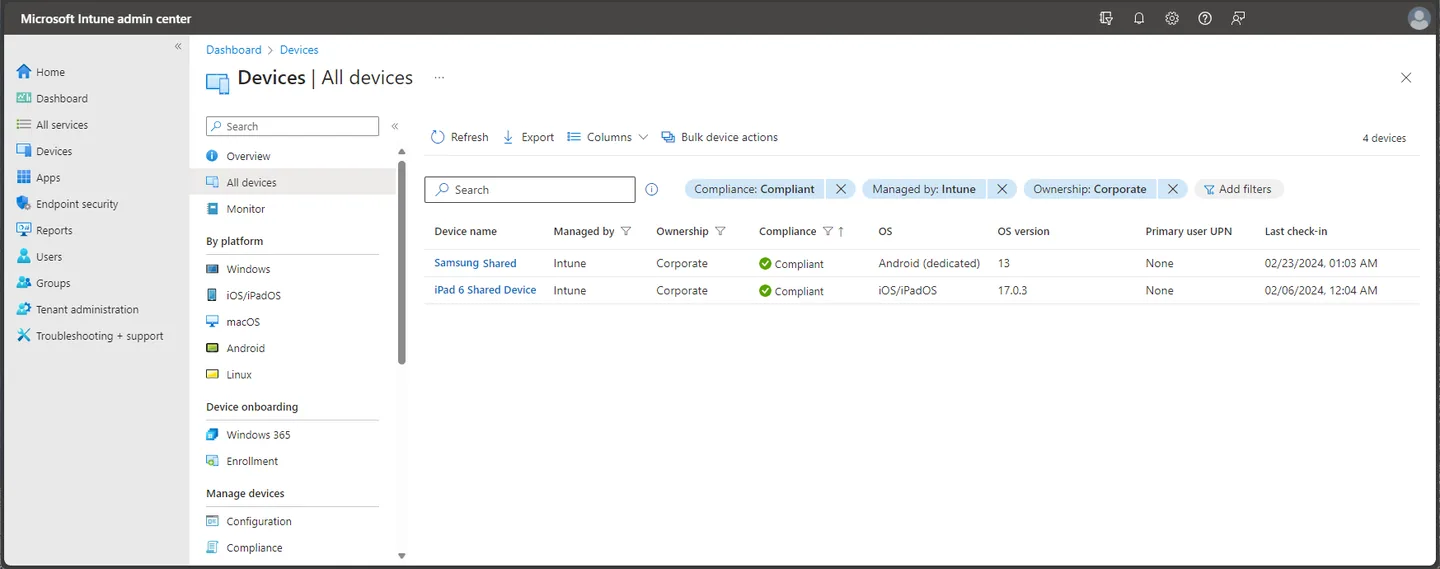
Microsoft Intune manages PICO 4 Enterprise and PICO Neo 3 Pro/Eye as corporate-owned AOSP devices, enrolled with a QR code.
What to check
Microsoft documents no compliance reporting for AOSP devices, and remote actions run one device at a time. Check the minimum PICO OS version for each model.
Best if you already run Workspace ONE
Omnissa Workspace ONE
- Choose it when
- You already run Workspace ONE and want headsets, phones and laptops in one console.
- Reconsider if
- You only need to manage headsets, or you need the Workspace ONE Launcher, which is not supported on PICO.
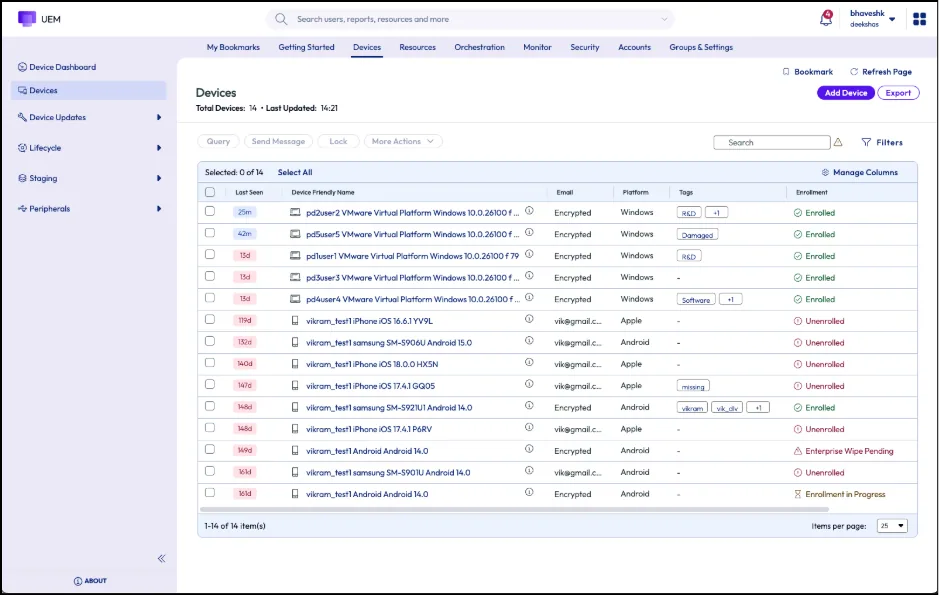
Omnissa Workspace ONE UEM manages XR headsets through its XR Hub alongside phones and laptops. Its 2026 XR guide lists six PICO models and other headset brands.
What to check
Headsets that are not new need a factory reset to enroll. Confirm the firmware minimum for each PICO model.
Official sources
How we ranked
We compared six VR device management platforms on six documented facts. Each table cell records what the vendor’s own pages state on the review date.
- Headset coverage
- Which PICO models and which other headset brands the vendor lists as supported.
- Phones and tablets in the same console
- Whether the same product manages phones and tablets alongside headsets.
- Headset experience controls
- Documented kiosk or launcher controls, and the content you can deliver: apps, videos, web links and files.
- Remote support
- Documented remote viewing, casting or control, and the headsets it covers.
- Entry cost
- Free plan or trial, published per-device price and minimum commitment.
- Enrollment and switching
- How headsets enroll, and whether moving from another MDM requires a factory reset.
Each use case names the job it needs done, such as PICO headsets managed by policy, or several headset brands in one console. The pick is the platform whose own documentation covers that job at the lowest published entry cost. For PICO fleets, that job includes policy-based control and room for Android phones and tablets, which is why Nomid leads there. Nomid does not offer the remote support ArborXR documents. We do not assign numeric scores.
This guide interprets vendor documentation. It does not include hands-on tests of every product, timed enrollment comparisons or checks of every headset and firmware combination. Vendor pages change, so confirm current details before you buy.
Leaving Meta Quest for Business
Meta stopped selling Quest for Business and Horizon managed services on 20 February 2026. It says existing customers keep support until 4 January 2030, and their licenses are now free.
Before you choose a replacement, list your headset models, the apps and content each site needs, and who resets a headset when a session fails. Then pilot the new platform on one headset of each model.
Questions buyers ask about VR device management
What is the best VR device management software?
It depends on the headsets you run. For PICO fleets, we pick Nomid. For mixed headset brands, ArborXR and ManageXR both list PICO, Meta Quest and HTC VIVE in one console. PICO Business Suite is free for a few PICO headsets on one site, and Intune or Workspace ONE make sense if you already run them. Pilot on your exact model and firmware.
What is the best MDM for PICO headsets?
We pick Nomid for PICO fleets: it manages PICO headsets by policy next to Android phones and tablets, with up to 10 VR devices on the Free plan. If you need remote viewing inside the headset, compare ArborXR and ManageXR, which document it on PICO. For a few headsets on one site, PICO Business Suite is free.
Can one MDM manage VR headsets and phones together?
Yes, with different depth. Nomid manages PICO headsets alongside Android Enterprise phones and tablets. Intune and Workspace ONE add headsets to a wider device estate. ArborXR and ManageXR focus on headsets and offer basic Android phone and tablet management. Check that every control you need is in the same product.
What happens to Meta Horizon managed services?
Meta stopped selling Horizon managed services and commercial Quest headsets on 20 February 2026 and says it supports existing customers until 4 January 2030. ArborXR and ManageXR document Meta Quest support. If you are moving to PICO hardware, also compare Nomid and PICO’s own tools.
Do PICO headsets use Android Enterprise enrollment?
Not usually. Intune and Workspace ONE manage PICO headsets as AOSP devices, the XR platforms use their own setup tools or QR codes, and Nomid provisions PICO headsets over USB through Nomid Ops. Ask each vendor which method applies to your model and firmware.
Can we support a headset remotely?
It depends on the vendor, model and plan. ArborXR documents screen casting with two-way audio on PICO, ManageXR documents screen streaming without audio, and PICO Business Device Manager shows a live view of one headset at a time. Nomid does not offer remote control for headsets. Have each vendor show the support session on your hardware.
Is there a free way to start?
Nomid’s Free plan covers up to 10 VR devices; confirm which features your plan includes. PICO Business Suite is free for PICO Business devices. ArborXR and ManageXR offer free trials.
Sources, ownership and updates
Each profile links to the official pages used for its claims. All links were reviewed on 3 November 2026. Vendor offers and supported models change, so confirm them before you buy.
Nomid MDM publishes this guide and has a commercial interest in Nomid. External links point directly to vendor pages without referral parameters.
- Nomid: PICO VR headset management
- Nomid documentation: policies for VR/PICO
- Nomid pricing and Free plan
- ArborXR: supported features by device model
- ArborXR: enroll Android tablets and phones
- ArborXR: kiosk mode
- ArborXR: Remote Assistance
- ArborXR: enroll devices with a QR code
- ArborXR pricing
- ManageXR: Education and Rooms
- ManageXR: supported devices
- ManageXR: preparing a generic Android device
- ManageXR: casting and screen viewing options
- ManageXR: offline updates from a USB-C drive
- ManageXR pricing
- PICO Business pricing
- PICO Business Device Manager
- Microsoft Learn: AOSP supported devices
- Microsoft Learn: AOSP corporate-owned userless enrollment
- PICO newsroom: Microsoft Intune
- Omnissa TechZone: XR device management with Workspace ONE
- Meta: An update on Meta for Work
Start managing your PICO headsets free.
Enroll up to 10 VR devices, assign your apps and content, and check them on your exact model before you roll out to the rest of the fleet.
