 Nomid
NomidThis document describes the process of provisioning Android devices using Google's Zero-touch Enrollment (ZT). It details the role of each actor involved, the necessary steps, and how integration with an EMM (Enterprise Mobility Management) solution ensures automatic and secure configuration. The goal is for devices to be delivered to the end-user already configured, without the need for manual intervention.
Important: Zero-touch does not automatically register or reset a used device. The equipment must be assigned to the organization by an authorized reseller and receives its configuration on first use or after a factory reset.
Prerequisites
- A compatible device purchased through an authorized channel and assigned to the company's Zero-touch account.
- The Android Enterprise and Zero-touch integration active in the correct company.
- A Zero-touch configuration associated with the DPC and enrollment data supplied by Nomid.
- A pilot policy created and validated before deployment at scale.
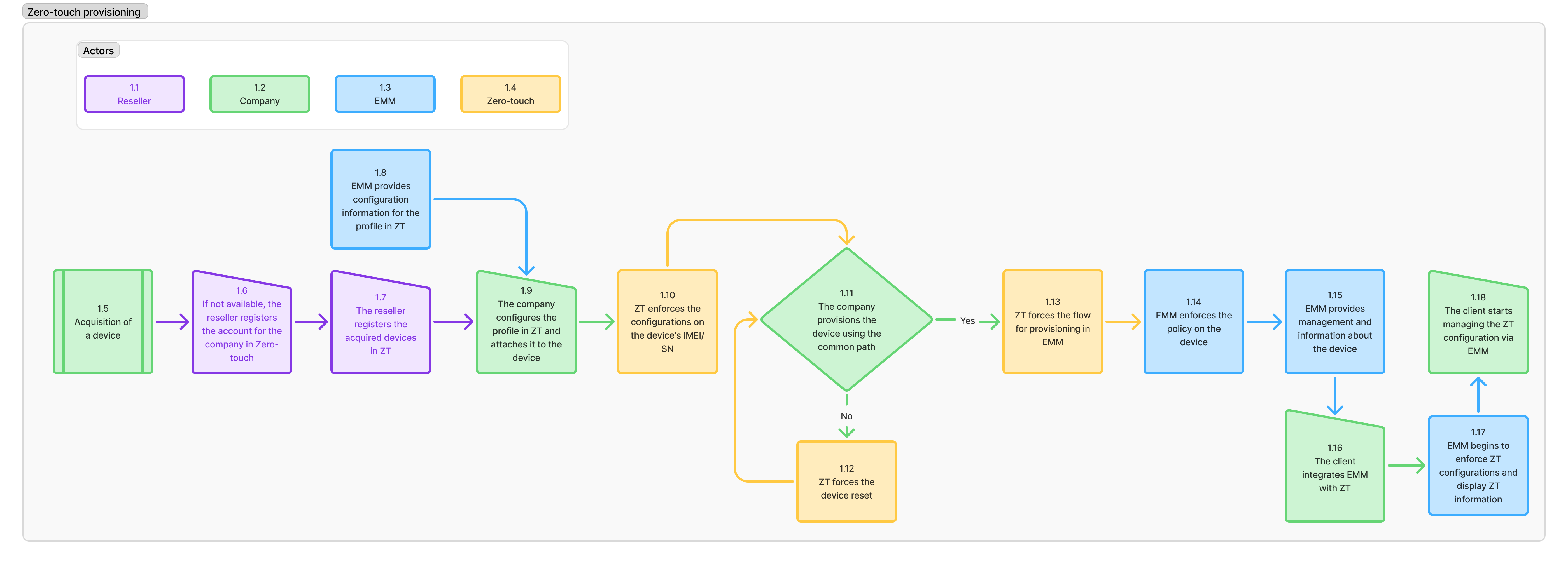
Actors Involved
- 1.1 Reseller: A company authorized by Google to sell devices with Zero-touch support. They register the devices in the ZT portal on behalf of the purchasing company.
- 1.2 Company: The organization that acquires the devices and defines the configurations to be automatically applied.
- 1.3 EMM (Enterprise Mobility Management): The device management platform used by the company to apply configurations, policies, and control devices.
- 1.4 Zero-touch (ZT): Google's platform that allows automatic configuration of Android devices before they are even turned on for the first time.
Provisioning Steps
1.5 Device Acquisition
The company purchases a Zero-touch compatible Android device through an authorized reseller.
1.6 Company Registration in ZT
If the company is not yet registered in the Zero-touch portal, the reseller will be responsible for creating this account, associating it with the organization's domain.
1.7 Device Registration in ZT
After purchase, the reseller registers the devices in the company's ZT portal. Identification is done via IMEI or serial number.
Configuration and Profile Association
1.8 EMM Provides the Configuration Profile
The EMM provides an enrollment URL (DPC extras) and parameters necessary for creating a provisioning profile in the ZT portal. This URL points to the management agent (DPC) that will be used.
1.9 Profile Association with the Device
The company accesses the ZT portal and associates the profile provided by the EMM to the registered devices.
Initial Application and Verification
1.10 Automatic Profile Application
When the device is turned on and connected to the internet for the first time, Zero-touch verifies its IMEI/SN and applies the configured profile, which automatically redirects to the EMM enrollment flow.
1.11 Is the Device on the Common Path?
The system checks if the device can proceed directly to the EMM enrollment flow. If yes, it follows the normal flow. If not (for example, if the device has already been used), it will need to be reset.
1.12 When the device must be reset
Zero-touch does not force a reset on a device that is already in use. The assigned configuration takes effect on the first eligible boot or after the next factory reset. Reset only after confirming backup, authorization, and the correct configuration in the Zero-touch portal.
EMM Enrollment and Policy Application
1.13 Start of the EMM Provisioning Flow
After the reset or confirmation that it is clean, ZT automatically directs the device to the EMM app, starting enrollment.
1.14 Policy Application by EMM
During enrollment, the EMM applies all defined policies, such as:
- Usage restrictions
- Mandatory applications
- Wi-Fi, VPN, email, etc.
1.15 Management Made Available
The device appears on the EMM dashboard and is monitored, with reports on status, location, usage, and integrity.
Integration and Consolidation of Management
1.16 ZT + EMM Integration
If the EMM supports Zero-touch integration, it can directly query and modify ZT profiles via API, eliminating the need for manual access to the portal.
1.17 EMM Takes Control of ZT Configuration
With active integration, the EMM displays the ZT configurations and allows modifications (such as reassigning profiles to new devices).
1.18 Unified Management via EMM
The company can completely manage device provisioning through the EMM, without needing to access the ZT portal again.
Final Result
This workflow ensures that corporate Android devices are delivered to the end-user:
- Fully configured
- Secure and controlled
- Without the need for manual setup
Additional Source
Based on Google's official documentation:
Zero-touch Topology - Component Explanation
This document provides a detailed explanation of all the numbered elements of the Zero-touch Enrollment (ZT) ecosystem topology as represented in the flowchart. The objective is to clarify the role of each actor and how they relate in the automated provisioning process of Android devices.
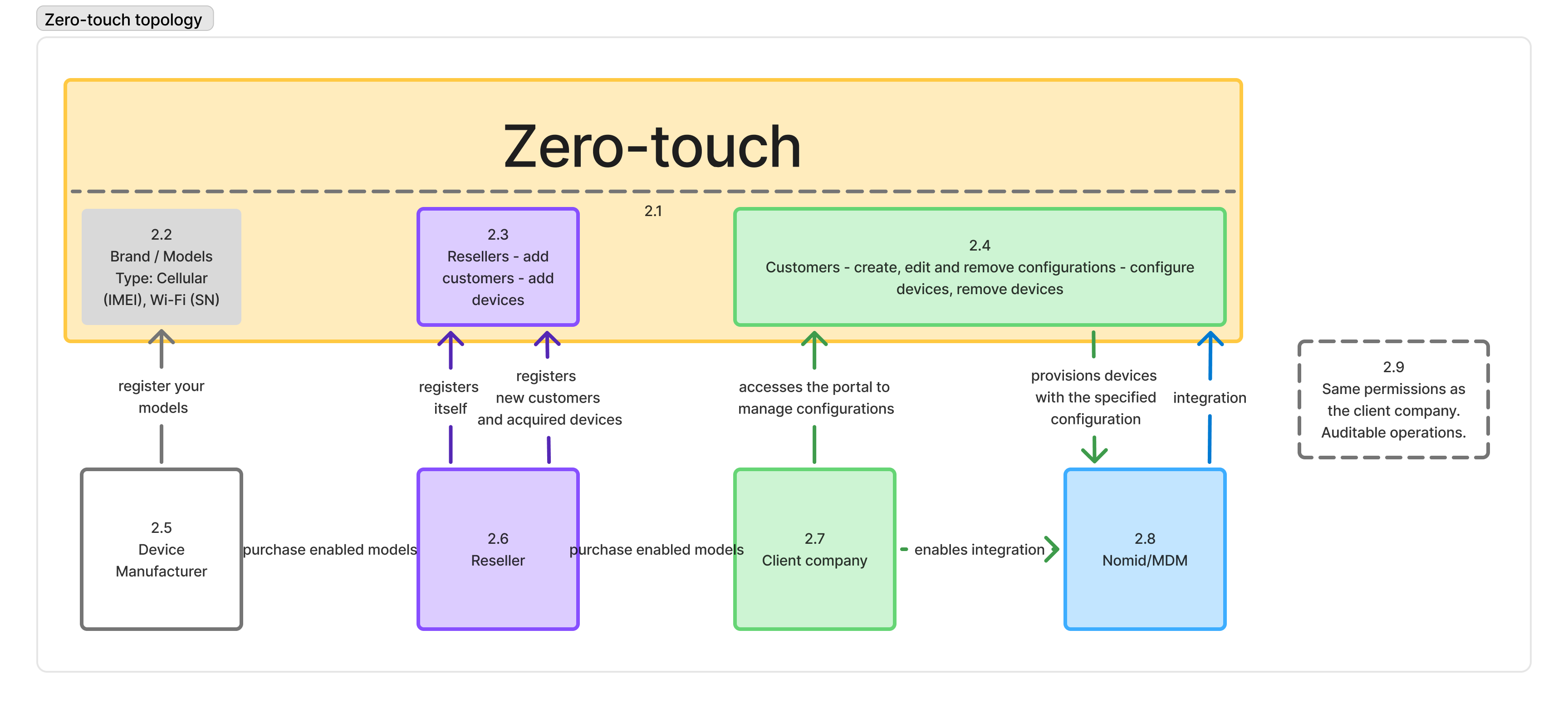
2.1 - Zero-touch (Platform)
The Google Zero-touch platform is the center of operation for the automated provisioning ecosystem of Android devices. It connects manufacturers, resellers, and end customers in a continuous flow of registration, configuration, and delivery of devices ready for use.
Core platform functionalities:
- Device registration (via IMEI/SN)
- Creation of configuration profiles
- Automatic assignment of profiles to devices
- Integration with EMM/MDM solutions (such as Nomid)
2.2 - Brand / Models
Manufacturers (OEMs) register their approved models on the Zero-touch platform, indicating:
- The brand and model of the device
- The type of connectivity (cellular, Wi-Fi)
- Unique identifiers such as IMEI and SN (Serial Number)
Only devices registered here can participate in the ZT provisioning ecosystem.
2.3 - Resellers
Resellers are authorized partners who:
- Purchase devices from manufacturers
- Register on the ZT platform
- Add clients (companies) to the portal
- Add the acquired devices (associating IMEI/SN to a client)
Without registration by a reseller, the client company cannot use ZT.
2.4 - Customers (Client Companies)
Client companies are organizations that have received devices from the reseller. Within the ZT portal, they can:
- Create, edit, and delete configuration profiles
- Assign and remove devices from profiles
- Delegate permissions to integrated systems (EMM)
They define how the devices should be configured when they are turned on for the first time.
2.5 - Device Manufacturer
The manufacturer is the one who produces the Android devices and registers their compatible models with Zero-touch. To do this, they register:
- Specific models (e.g., Galaxy A23, Moto G53)
- Supported network types
- Identifiers such as IMEI/SN
Only models approved here can be sold as "ZT enabled".
2.6 - Reseller
Resellers act as intermediaries between manufacturers and client companies:
- They purchase enabled models from manufacturers
- They register as resellers on the ZT portal
- They register devices for clients
- They assign each IMEI/SN to a business account
They are responsible for associating devices with the accounts of the companies that purchased them.
2.7 - Client Company
The client company is the final owner of the devices. After receiving the devices:
- They access the ZT portal to create and apply configuration profiles
- They view and manage the registered devices
- They ensure that when the device is turned on, it configures automatically
From here, the company can choose to manage the devices directly or integrate with an MDM.
2.8 - Nomid/MDM (Integration)
The client company can enable integration with an MDM solution, such as Nomid MDM. This allows:
- Managing ZT profiles directly through the management platform
- Automating profile assignments
- Initiating provisioning without accessing the ZT portal
The integration follows Google's OAuth2 authentication standard and ensures profile/device synchronization.
2.9 - Integration Permissions
When the MDM (such as Nomid) is integrated:
- It performs only the actions authorized by the company through the scopes granted during integration
- It can perform actions such as assigning profiles and querying devices
- All actions are auditable by Google, maintaining traceability and compliance
Conclusion
The Zero-touch flow depends on the collaboration between manufacturers, resellers, and client companies, with the Google ZT platform at the center of it all. With integration with MDMs like Nomid, the entire process can be automated, secure, and scalable, reducing errors and manual work.
Common problems
- The device does not appear in the portal: ask the reseller to confirm that the equipment was assigned to the correct company account.
- The device starts as a personal device: verify that a configuration is assigned and, after correcting it, perform an authorized factory reset.
- Enrollment does not reach Nomid: review the DPC, token, connectivity, and Android Enterprise binding in Integrations.
- The policy is not applied: use Devices to confirm that enrollment completed and that the expected policy was received.